➤ Anmelden | |
TPC Hosting Support
Support-Center
Es gab ein Problem beim Laden der Kommentare.

How to Delete Categories in WordPress

HelpDesk  »  Wissensdatenbank  »  Artikel betrachten

  Drucken

If you want to remove the WordPress category, then follow this instruction:

1. Log in to the WordPress dashboard.


2. From the Dashboard menu, go to Posts and click on Categories.
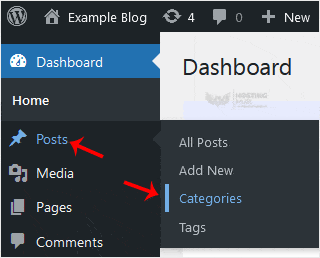
3. Hover your mouse over a category you want to remove and click on Delete. The confirmation option will appear. Confirm with OK.


Teilen über
Fanden sie diesen Artikel hilfreich?  

Ähnliche Artikel


Kommentar

hinzufügen Kommentar

Antworten an  

Kategorien