➤ Anmelden | |
TPC Hosting Support
Support-Center
Es gab ein Problem beim Laden der Kommentare.

How to Delete Email Messages in Outlook 2019

HelpDesk  »  Wissensdatenbank  »  Artikel betrachten

  Drucken

You can easily remove email in Outlook 2019.

If you use the POP email protocol, the email will only be removed from Outlook 2019 and remain on the mail server. With IMAP, email is deleted on both Outlook 2019 and the mail server.

1. Open Outlook 2019.

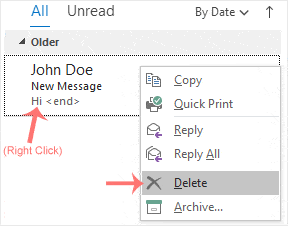
2. Go to Inbox, right-click on the message you want to remove and click on Delete.

Teilen über
Fanden sie diesen Artikel hilfreich?  

Ähnliche Artikel


Kommentar

hinzufügen Kommentar

Antworten an  

Kategorien