➤ Anmelden | |
TPC Hosting Support
Support-Center
Es gab ein Problem beim Laden der Kommentare.

How to Remove a Database User in Plesk

HelpDesk  »  Wissensdatenbank  »  Artikel betrachten

  Drucken

1. Log in to your Plesk account.

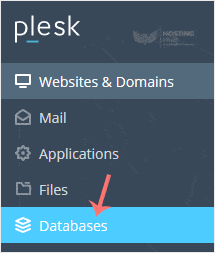
2. Click on Databases from the Sidebar Menu.
3. Click on User Management from the right sidebar.

4. Under Database Users, checkmark the appropriate database user you want to remove and click on Remove.

5. A confirmation box will appear. Confirm with Yes to remove the user.


Teilen über
Fanden sie diesen Artikel hilfreich?  

Ähnliche Artikel


Kommentar

hinzufügen Kommentar

Antworten an  

Kategorien