A subdomain is an additional part of your primary domain. Please, follow this tutorial to remove a subdomain in DirectAdmin.
1. Log in to your DirectAdmin Account.
2. In the Account Manager section, click on Subdomain Management or type Subdomain in the navigation filter box, and the option will appear. Click on it.
3. Under the Subdomain Name, select the subdomain name you want to remove.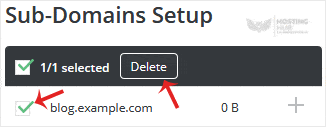
4. Click on Delete. If you also want to remove directory contents, check-mark Remove Directory Content and click on Delete.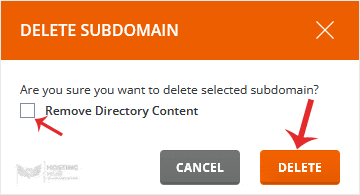
Your subdomain will be removed.
