➤ Autentificare | |
TPC Hosting Support
Centru de suport
A apărut o problemă la încărcarea comentariilor.

How to Delete Email Messages in Outlook 2019

Portal de suport  »  Bază de cunoștințe  »  Vizualizare articol

  Tipărește

You can easily remove email in Outlook 2019.

If you use the POP email protocol, the email will only be removed from Outlook 2019 and remain on the mail server. With IMAP, email is deleted on both Outlook 2019 and the mail server.

1. Open Outlook 2019.

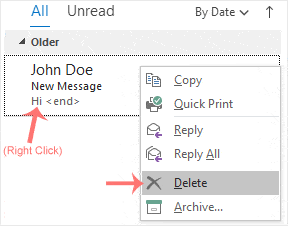
2. Go to Inbox, right-click on the message you want to remove and click on Delete.

Distribuiți prin
Ați găsit acest articol util?  

Articole similare


Comments

Adaugă Comment

Răspuns pentru  

Categories