➤ Autentificare | |
TPC Hosting Support
Centru de suport
A apărut o problemă la încărcarea comentariilor.

How to Rename an FTP Username in Plesk

Portal de suport  »  Bază de cunoștințe  »  Vizualizare articol

  Tipărește

1. Log in to your Plesk account.

2. Click on Websites & Domains from the Sidebar Menu.

3. Under the list of Domain names, click on the appropriate domain name.

4. Under Files & Databases, click on FTP Access.
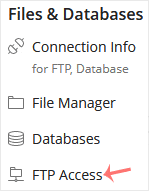
5. Click on the appropriate FTP account.

6. Enter the new FTP name in the FTP account name field and confirm with OK.


Distribuiți prin
Ați găsit acest articol util?  

Articole similare


Comments

Adaugă Comment

Răspuns pentru  

Categories